

Limit what your runner may run
Who this is for: people who run a Liitora runner in their own network and want a rule of their own about what it may run, for example a security team that must sign off on every system a workflow reaches.
Before you start: check these two things.
- A runner group with a running runner. See Run automations in your own environment.
- Access to the runner’s machine, to write a file next to the runner’s settings and restart it.
A runner only runs workflow versions that a person approved in Liitora and that Liitora signed. A policy file adds a check that stays in your hands: it lists what workflows on this runner may use. Before a run starts, the runner compares the version with the policy. If the version goes beyond it, the runner refuses it, and the run fails with policy_refused. Liitora can’t change the policy and never sees it.
Without a policy file, the runner runs every approved version of its group, as before.
What the runner checks
Section titled “What the runner checks”Every version Liitora signs carries a list of what it may use, worked out from the workflow itself, never typed by hand:
- Destinations: the hosts of the connections the workflow uses, and the addresses written in the
urlofplatform/http.requestandplatform/webhook.sendsteps, ashost:port. Aurlbuilt from an expression is only known while the run is going. Then the runner’s allowed destinations stop the call instead. - Secret names: the secrets the steps read, and the secrets the connections use.
- Actions with their versions, for example
platform/http.request@1oracme/fetch-devices@2.1.3. - Scripts: whether the workflow has code of its own, a
run:step orplatform/transform.
The runner also works out what it can from the signed workflow itself and checks both lists. If something were missing from the list Liitora sent, the runner still finds it.
Write the policy file
Section titled “Write the policy file”Write a JSON file, for example /etc/liitora/runner-policy.json:
{ "destinations": ["erp.example.internal:443", "10.0.0.5:8443"], "secret_prefixes": ["erp_"], "new_secrets": "approve", "approved_secrets": ["erp_key", "erp_client"], "actions": ["platform/*", "acme/fetch-devices@v2"], "scripts": "deny"}| Key | What it allows |
|---|---|
destinations |
The only places a workflow may reach, as host:port ([address]:port for an IPv6 address), always with the port and without https://. A workflow address like https://erp.example.internal/api is erp.example.internal:443. An empty list [] allows none. |
secret_prefixes |
Every secret name must start with one of these. "" allows every name. |
new_secrets |
allow: any name with an allowed prefix. approve: the name must also be in approved_secrets. |
approved_secrets |
The secret names you have approved. Each must start with one of secret_prefixes. Optional, empty by default. |
actions |
* (every action), owner/* (every action of one owner, for example platform/*), owner/name (every version of one action) or owner/name@vX, @vX.Y or @vX.Y.Z. A version allows that version and every version under it: @v2 allows 2.1.3, and @v2.1 allows 2.1.0 but not 2.2.0. Workflows a step calls are written workflow/owner/name. |
scripts |
deny refuses workflows with code of its own. allow lets them run. |
Every key except approved_secrets must be there. The runner refuses to start when the file has a key it doesn’t know, a value it can’t read, or permissions that let other users change it. This way a typing mistake never turns into a policy that allows more than you meant.
Start the runner with the policy
Section titled “Start the runner with the policy”-
Let only the owner change the file, for example root, while the runner can still read it:
Terminal window sudo chown root:root /etc/liitora/runner-policy.jsonsudo chmod 644 /etc/liitora/runner-policy.json -
Add the setting to the runner’s settings file (
runner.env):LIITORA_RUNNER_POLICY_FILE=/etc/liitora-runner/policy.json -
Start the runner with the file mounted read-only:
Terminal window docker run -d --name liitora-runner --restart unless-stopped \--read-only --cap-drop ALL --security-opt no-new-privileges:true \-v liitora-runner-state:/var/lib/liitora-runner \-v /etc/liitora/runner-policy.json:/etc/liitora-runner/policy.json:ro \--env-file runner.env <liitora image> runner -
Check the runner’s log. It says
runner policy loaded. If it stopped instead, the log names the file and the key that is wrong.
The runner reads the file when it starts. After you change the policy, restart the runner.
How the policy works with the allowed destinations
Section titled “How the policy works with the allowed destinations”LIITORA_RUNNER_EGRESS_ALLOW still lists where the runner may connect. With a policy, a run may connect only to places in both lists. If the policy lists a destination that LIITORA_RUNNER_EGRESS_ALLOW doesn’t, the runner logs a warning when it starts, and runs can’t reach that destination.
While a run is going, the runner also hands out only the secrets the policy allows. A step that asks for any other secret gets nothing.
Approve a new secret name
Section titled “Approve a new secret name”With "new_secrets": "approve", a workflow that starts using a secret name you haven’t approved yet is refused with Secret name not approved yet, even when its prefix is allowed. To approve it:
- Check what the workflow does with the secret, for example in the version comparison in Liitora.
- Add the name to
approved_secrets. - Restart the runner, then start the run again.
When a run is refused
Section titled “When a run is refused”The run fails before any step starts. The run page shows Refused by a runner’s local policy with:
- Rule: which part of the policy the version went beyond. It is one of Destination not listed, Secret name not allowed, Secret name not approved yet, Action or version not allowed or Scripts not allowed.
- What the policy does not allow: the destination, secret name or action. Scripts have no item.
- Runner group: the group whose runner refused it.
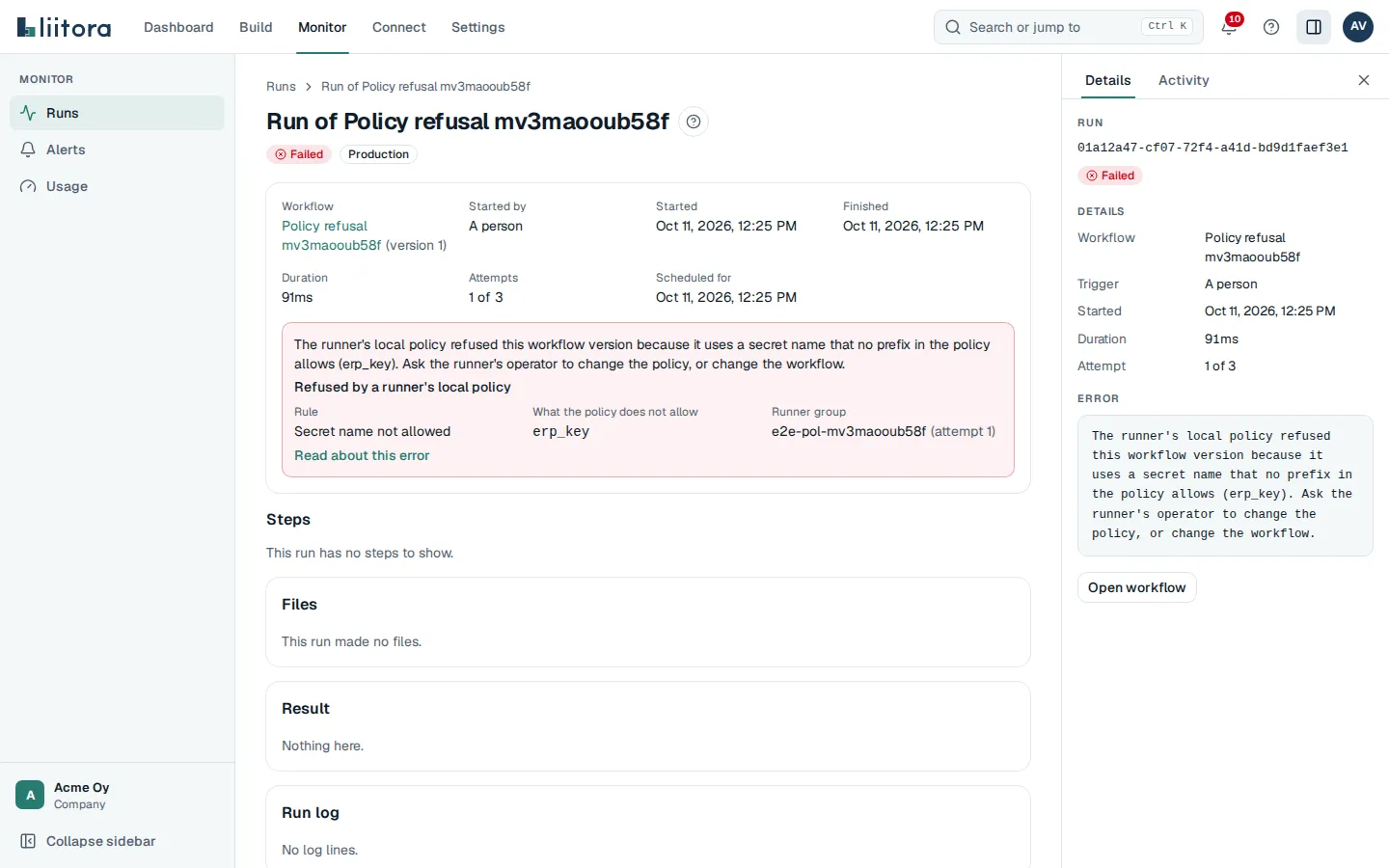
The runner sends Liitora only the rule and the item, never the policy. Liitora shows the item only when it is part of that version, and it writes the error message itself. The same details are in the API (policy_refusal on the run) and in your AI assistant’s get_run tool.
To fix it, either change the policy and restart the runner, or change the workflow so it stays within the policy and approve the new version. Then start the run again.